

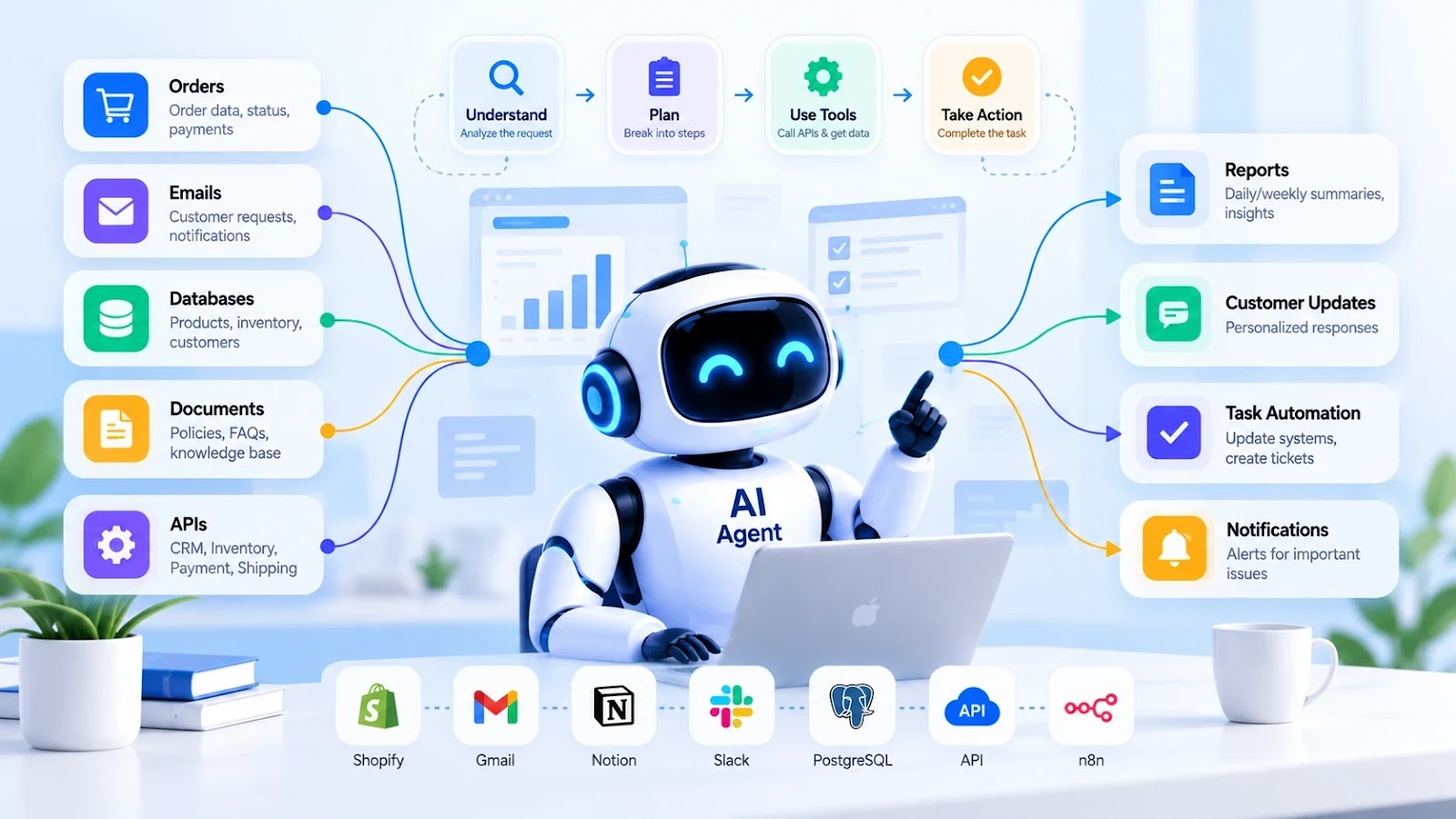
Most businesses do not struggle because they lack software. They struggle because people still spend hours moving information between systems, checking records, following up on pending tasks, and preparing reports.
A sales team checks its CRM every morning. An operations team investigates delayed orders. A support team searches for customer information before replying to emails. Each task may be simple on its own, but together they consume a surprising amount of time.
This is where Agentic AI can make a practical difference.
Instead of building another chatbot that only answers questions, you can build an AI agent that works with your existing applications, investigates problems, prepares actions, and helps complete a defined workflow.
Let's explore how to design one using a realistic business scenario.
The Real Problem: Too Much Manual Work
Imagine running an online store with hundreds of orders, multiple suppliers, and a small operations team.
Every morning, someone needs to identify delayed orders, check inventory, find missing information, and prepare updates for customers.
The existing process might look like this:
- Open the order management dashboard.
- Filter orders that have not moved forward.
- Check inventory and payment status.
- Search for relevant customer or supplier information.
- Decide what needs attention.
- Prepare follow-up messages.
- Update a spreadsheet or internal system.
The problem is not that these tasks require advanced intelligence individually. The problem is that they involve several systems, repeated decisions, and constant context switching.
A well-designed AI operations agent can coordinate much of this work while leaving sensitive decisions under human control.
What Should the AI Agent Actually Do?
Start with a clear responsibility rather than giving the agent an unlimited goal such as "run my business."
For this example, the goal is simple:
Review pending orders, identify exceptions, explain what needs attention, and prepare recommended next steps.
The agent receives an order ID or a scheduled task. It can then use a small set of approved tools to gather information.
For example, it may need to:
- Retrieve the order status.
- Check whether payment has been confirmed.
- Read the available inventory.
- Inspect delivery information.
- Identify missing or conflicting records.
- Recommend an appropriate next step.
- Prepare a customer update for review.
The agent should not invent missing information or automatically issue refunds, change prices, or cancel orders without the required permissions and approvals.
How the Workflow Works
A practical architecture separates the AI model from the business systems it interacts with.
Step 1: Receive a task
A scheduled job, dashboard action, or internal request starts the workflow.
Example:
"Review pending orders and prepare a report of orders that need attention."
Step 2: Retrieve the necessary data
The application calls authorized APIs to retrieve order records, payment status, inventory information, and delivery updates.
The model does not need direct access to the entire database. It receives only the information required for the task.
Step 3: Analyze the situation
The agent compares the available information and identifies exceptions.
For example, an order may be marked as paid but still awaiting processing because the product is out of stock.
The agent can flag the problem and explain which records support its conclusion.
Step 4: Prepare an action
Depending on the situation, the agent may recommend checking supplier availability, preparing a customer notification, or escalating the issue to an operations employee.
Step 5: Apply the correct permission rules
Read-only checks can usually happen automatically. Actions that affect customers, payments, or important records should follow predefined approval rules.
Step 6: Verify the outcome
After an approved action executes, the application checks the actual result.
If an update fails, the agent should report the failure rather than claiming that the task was completed.
A Simple Python Example
You can start with a small Python function that retrieves business information and returns a structured recommendation.
The following example uses mock data to demonstrate the decision logic. It does not connect to a live store or modify real orders.
from typing import Any

ORDERS = {
    "ORD-1042": {
        "payment_status": "paid",
        "order_status": "processing",
        "stock_available": False,
        "tracking_status": "not_dispatched",
    },
    "ORD-1043": {
        "payment_status": "pending",
        "order_status": "awaiting_payment",
        "stock_available": True,
        "tracking_status": "not_dispatched",
    },
}


def review_order(order_id: str) -> dict[str, Any]:
    order = ORDERS.get(order_id)

    if order is None:
        return {
            "order_id": order_id,
            "status": "not_found",
            "recommended_action": "request_manual_review",
        }

    issues = []

    if order["payment_status"] != "paid":
        issues.append("Payment requires verification.")

    if not order["stock_available"]:
        issues.append("Product is currently unavailable.")

    if (
        order["payment_status"] == "paid"
        and order["stock_available"]
        and order["tracking_status"] == "not_dispatched"
    ):
        issues.append("Check the dispatch schedule.")

    if issues:
        return {
            "order_id": order_id,
            "status": "needs_attention",
            "issues": issues,
            "recommended_action": "human_review",
        }

    return {
        "order_id": order_id,
        "status": "ready",
        "issues": [],
        "recommended_action": "continue_normal_workflow",
    }


if __name__ == "__main__":
    result = review_order("ORD-1042")
    print(result)
This is ordinary Python business logic, not a complete autonomous AI agent. That distinction is important.
In a full implementation, an AI model can interpret a user's request, select an approved tool, and explain the result. Deterministic application code should still enforce business rules, permissions, and actions that must be performed exactly.
Where Does the AI Model Fit?
The model becomes useful when a workflow involves natural-language requests, ambiguous situations, or multiple possible next steps.
For example, an operations employee might ask:
"Find paid orders that are delayed, explain why, and prepare a customer update for each one."
The AI application can interpret the request, call the relevant tools, analyze the returned information, and draft updates.
A typical implementation may contain:
- LLM API: Interprets requests and helps select the next tool.
- Python backend: Enforces business logic and coordinates execution.
- FastAPI: Exposes the workflow through authenticated endpoints.
- PostgreSQL or MongoDB: Stores order information and workflow state.
- Existing business APIs: Retrieve or update approved records.
- Task queue or scheduler: Runs longer jobs and recurring checks.
- Audit logs: Record tool calls, approvals, errors, and outcomes.
You do not need every component on day one. A single backend, one model API, and two read-only tools may be enough to validate the idea.
Three More Practical Ways to Use Agentic AI
1. AI Agent for Daily Sales Reporting
Instead of manually collecting data from several dashboards, an agent can retrieve sales figures, calculate totals using code, compare results with a defined period, and prepare a summary.
It might identify products with declining sales or orders that require attention.
The final report should include the underlying data sources and clearly distinguish measured results from AI-generated explanations.
2. AI Agent for Software Development
A development agent can read error logs, inspect relevant source files, identify likely causes, and suggest a fix.
It can also run approved tests in an isolated environment and summarize failures.
For a real development workflow, keep production credentials protected and require code review before merging or deploying changes.
3. AI Agent for Customer Support
A support agent can classify incoming requests, retrieve approved documentation, look up authorized customer records, and draft a response.
Straightforward questions can be handled with minimal intervention. Complaints, disputed payments, account security issues, and unusual requests can be routed to a human.
The goal is not to remove human support. It is to reduce the time employees spend gathering information and performing repetitive steps.
How to Build and Deploy Your First Agent
If you are planning to implement this in a real application, use a gradual approach.
Start with one measurable task.
Choose a workflow that consumes time today and define what successful completion means.
Connect read-only tools first.
Allow the agent to search and retrieve the information it needs without changing business records.
Add tool calling.
Let the model select from a small set of clearly described functions. Validate every argument on the server.
Add persistent workflow state.
For longer tasks, record the current step, tool results, errors, and approval status so work can resume safely after a failure.
Introduce controlled actions.
Once the read-only workflow is reliable, allow specific write operations through a separate authorization layer. Require human approval for consequential actions.
Test real failure cases.
Test missing records, expired credentials, duplicate requests, inconsistent data, unavailable APIs, and unexpected model outputs.
Monitor actual performance.
Track completion rates, failed actions, time saved, model costs, and how often employees need to correct the result.
A successful pilot should demonstrate measurable improvement, not merely produce impressive responses.
Security Is Part of the Design
An AI agent connected to business systems can create real consequences if its access is poorly controlled.
Use separate permissions for reading data and changing it. Never rely on a prompt alone to prevent unauthorized operations.
Validate access to each record, keep credentials outside model inputs, and treat external documents and API responses as untrusted data.
For sensitive actions, the application should enforce an approval step before execution. The approval must apply to the exact action being performed, and the result should be recorded in an audit log.
These controls are particularly important when agents interact with customer information, financial records, cloud infrastructure, or production systems.
How Do You Measure Whether It Is Working?
Before deployment, record how the existing process performs. Then compare the results after introducing the agent.
Useful metrics include:
- Time required to complete the workflow.
- Percentage of tasks completed correctly.
- Number of manual corrections needed.
- Frequency of failed or repeated tool calls.
- Cost per successfully completed task.
- Number of actions escalated to a human.
For example, if preparing a daily report takes 45 minutes, measure whether the new workflow reduces that time without increasing reporting errors.
Do not assume the agent saves time simply because it automates several steps. Measure the full process, including reviews, failures, and maintenance.
Final Thoughts
Agentic AI becomes valuable when it solves a specific operational problem rather than simply adding another layer of technology.
An order-management agent, sales reporting assistant, or software testing agent can coordinate several steps that would otherwise require manual work. The key is to combine model-driven decisions with reliable application logic, approved tools, and clear boundaries.
Start small. Connect real data carefully. Let the agent recommend actions before allowing it to execute them. Measure the outcome and expand only when the workflow proves reliable.
The best AI agent is not the one that does everything on its own. It is the one that consistently completes useful work within the right limits.
Frequently Asked Questions
What is a real-world example of Agentic AI?
An order-management agent that checks payment and inventory information, identifies delayed orders, and prepares recommended actions is one practical example.
Can I build Agentic AI using Python?
Yes. Python can coordinate an LLM API, application functions, database queries, and external APIs. Additional orchestration tools may be useful for longer or more complex workflows.
Does Agentic AI require a vector database?
No. A vector database is useful when the application needs semantic search across documents. Structured workflows can operate with ordinary databases and APIs.
Can Agentic AI work with existing software?
Yes. Agents can interact with existing systems through authorized APIs, function calls, and compatible tool protocols. The existing software does not necessarily need to be replaced.
Should an AI agent be fully autonomous?
Not necessarily. The appropriate level of autonomy depends on the task. Low-risk information retrieval may be automated, while financial transactions, destructive operations, and sensitive account changes should have stronger controls.